

Academic Information System — SIAKAD
An affordable academic information system for small and mid-sized campuses — one place for students, lecturers, and staff to run the semester, from course planning to transcripts.
- Type
- Academic Information System
- Scope
- Student records · Course planning · Grades & transcripts · Lecturer portal · Finance · LP2M · PDDikti Feeder integration
- Stack
- Next.js · NestJS · PostgreSQL · Redis
Our clients
- Sekolah Tinggi Keguruan dan Ilmu Pendidikan Majenang

01SIAKAD
Overview
Academic administration involves many people — students, lecturers, and academic staff — and processes that repeat every semester: course registration, schedules, grading, and reporting.
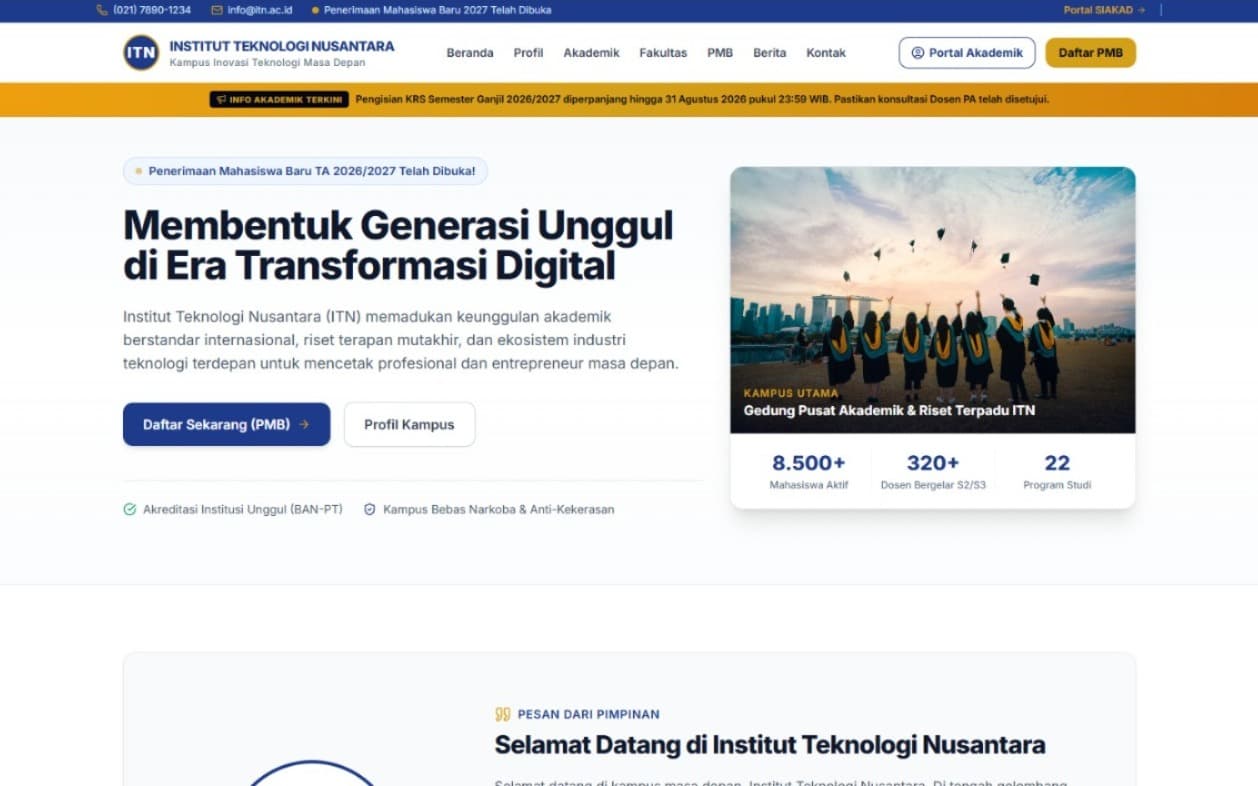
SIAKAD brings those processes into a single web-based system, with a public campus website at the front and role-based portals behind it.
02SIAKAD
Why we built it
An academic system shouldn't be something only large universities can afford.
Many small and mid-sized campuses still run their academic administration on spreadsheets and paper, because academic systems are typically priced for large institutions.
SIAKAD was built so these campuses can have a complete academic system at a cost that fits their budget — without giving up the features they need every semester.
03SIAKAD
What the system covers
- 01
Student records
Central student data — profile, study program, academic status, and history.
- 02
Course planning (KRS)
Students plan their semester courses online; academic advisors review and approve them.
- 03
Grades & transcripts
Lecturers enter grades; students see results per semester and their cumulative transcript.
- 04
Lecturer portal
Teaching schedules, class lists, and grade input in one place.
- 05
Finance
Tuition billing and student payment records, kept in the same system as academic data.
- 06
LP2M
Research and community service records for lecturers, managed by the LP2M unit in one module.
- 07
PDDikti Feeder integration
Academic data synchronized with PDDikti Neo Feeder, so reporting doesn't require entering data twice.
- 08
Academic announcements
Deadlines and academic notices published across the website and portals.
- 09
Campus website
A public website connected to the academic portal and the student admission (PMB) system.
04SIAKAD
Features by role
One system with ten login roles — each sees only what's relevant, from students planning courses to the Super Admin running the whole institution.
- login roles
- 10login roles
- access roles
- 13access roles
- PDDikti Neo Feeder sync
- 2-wayPDDikti Neo Feeder sync
- shared database
- 1shared database
01Student Portal
Run your studies from one screen10 features
Everything an active student needs, from planning courses each semester to checking payment status — without queuing at the academic office.
Academic dashboard
GPA, credits earned, current KRS status, and tuition status at a glance.
Online course planning (KRS)
Choose courses each semester with automatic credit limits, within the window set by the academic office.
Class schedule
A weekly timetable built automatically from the KRS approved by the academic advisor.
Exam schedule & card
Midterm and final exam schedules with date, time, room, and invigilator; printable exam cards, with a warning when bills are still unpaid.
Attendance
Attendance per course and per session, flagging the 75% minimum required to sit exams.
Results & grades (KHS)
Semester results with semester GPA, cumulative GPA, GPA trend, and grade distribution.
Final project / thesis
Submit a proposal, work with supervisors, register for the proposal seminar and thesis defense, then follow the schedule, examiners, and final grade in one staged flow.
Graduation (yudisium)
Apply for graduation once every requirement is met (credits, GPA, thesis, paid bills) — checked automatically.
Letter requests
Request letters (internship, research permits, scholarship recommendations, and more) online and track them until issued.
Profile
Manage personal data, contacts, and a profile photo; birthplace is chosen from a searchable list of regencies and cities.
02Lecturer Portal
From teaching schedule to approved syllabi11 features
One place for every academic duty: teaching, grading, advising, and preparing course documents.
Teaching schedule
Classes taught each academic year, with day, time, room, and enrollment; take attendance straight from the dashboard.
Class attendance
Record attendance each session, summarized automatically across the semester.
Exam schedule & invigilation
Midterm and final schedules for your classes plus invigilation duties, with room and headcount.
Course contract
Set grading weights (assignments, midterm, final, attendance) per class and publish them to students.
Structured syllabus (RPS)
SN-Dikti-format syllabus — learning outcomes, topics, methods, references, and a 16-week plan — submitted for approval by P2M.
Grade entry
Save as draft or publish; locked automatically outside the window set by the academic office.
Academic advising
Advisees, their KRS history, consultations, and KRS approval.
Thesis supervision
Respond to supervision notes, approve proposals and theses (every supervisor must approve), and see the seminars and defenses you examine.
Letter approval
Approve or reject advisees' letter requests before they reach the academic office.
Profile & employment
Manage biodata and academic history; employment status is set by HR and is view-only for lecturers.
Research & community service reports
Record research and community service outputs for LP2M.
03Academic Office (BAAK)
Academic administration control center13 features
The academic office manages master data, curricula, scheduling, and every teaching process from here.
Real-time dashboard
Students by program, status (active/leave/graduated/dropped out), gender, and cohort trends — straight from the database.
Student & lecturer records
Layered filters, one-click active status, and Excel/PDF export of the filtered results.
Curriculum & courses
Course catalog per curriculum, including final-project and field categories (thesis, community service, teaching practice).
Class scheduling
Academic years, buildings, rooms, and class schedules with automatic clash detection.
Midterm & final exam scheduling
Set date, time, room, and invigilators per class; room and invigilator clashes are blocked, and students with two exams at once are flagged.
KRS monitoring
Track KRS submissions across programs and open or close the filling window.
Final projects / theses
Assign supervisors, schedule proposal seminars and thesis defenses with examiners, and enter final grades — tracked stage by stage.
Graduation (yudisium)
Verify graduation applicants and set the graduation date, decree number, and honors; student status switches to Graduated automatically.
Final-project enrollment
Students taking final-project or field courses who are waiting for a supervisor.
Attendance & grades
Attendance across classes, lecture reports, and grade monitoring and correction.
Official letters
Issue official letters after advisor approval, with automatic numbering.
News & announcements
Write campus news and announcements in a rich-text editor, published straight to the public site.
PDDikti reporting
Two-way Neo Feeder sync: pull, compare local data with Feeder, then push or update students, education history, classes, KRS, grades, and per-semester activity (AKM).
04Super Admin
Institution settings & system security8 features
Full access, from faculty structure to public-site content — the only role that can create accounts for other roles.
Server monitoring
Database health, latency, and PDDikti Feeder connectivity in real time.
Website analytics
Traffic statistics for the public campus site.
Institution master data
Institution profile, faculties, programs with dean and head-of-program titles that appear on documents automatically, and the academic calendar.
User management
Manage accounts for every role: lecturers, students, staff, admins, and reviewers.
Student ID format
Define automatic student ID (NIM) numbering to match campus policy.
Bank & DIKTI settings
Configure the payment gateway and PDDikti Neo Feeder credentials.
Signature rules
Set the signing official for each type of official letter.
Public-site CMS
Edit the hero, leadership welcome, announcement banners, and contacts on the campus homepage.
05Admissions (PMB)
Student admissions, end to end7 features
From online application to an enrolled, active student.
Admission waves
Set the period, quota, and fee for each intake wave.
Tracks & classes
Manage selection tracks, application types, and class options.
Document verification
Review and validate applicants' documents before selection results.
Results & enrollment
Set selection results and process re-registration into active students.
Payments
Track application and re-registration fees.
Affiliate program
Track applicants who arrive through each partner's referral link.
Admissions summary
Applicant statistics by track, wave, and program in one dashboard.
06LP2M
Research, community service, and IP5 features
Records every research and community service output.
Research reports
Lecturer research with scheme, funding, and verification status.
Community service (PkM)
Record community service activities and their partner communities.
IP & patent center
Manage copyright and patent applications through to certificate.
Document bank
Guidelines, regulations, and proposal templates for research and community service.
Accreditation summary
Per-program data summaries for BAN-PT accreditation forms.
07P2M (Quality Assurance)
Academic quality assurance5 features
Keeps the internal quality cycle (SPMI) running: set standards, audit against them, and approve course documents.
Quality standards
SPMI standards by category, with indicators and targets.
Internal quality audit
Schedule and record internal audits per program: compliant, minor, or major findings.
Syllabus validation
Review lecturers' syllabi, then approve or return them with revision notes.
Audit follow-up
Track open findings across programs, with overdue flags.
Quality documents
Guidelines, regulations, form templates, and audit instruments.
08Program Admin
Control of a single study program7 features
A restricted account that sees only its own program — enforced on the server from the logged-in account, so other programs stay out of reach.
Program dashboard
Program profile, head of program, and live stats: active students, lecturers, courses, and running classes.
Students
Every student in the program with cohort, status, advisor, credits, and GPA, with filters and search.
Lecturers
Home-base lecturers with position, employment status, advisee count, and current teaching load.
Schedule & classes
Classes per semester for the program's courses: lecturer, schedule, room, and fill rate against quota.
Courses
Manage the program's own course catalog: curriculum, credits, semester, and final-project categories.
Thesis monitoring
Each student's thesis stage: proposal, supervisor, seminar, defense, and final grade.
Graduation monitoring
The program's graduation applicants with credits, GPA, honors, and the academic office's decision.
09Finance Office
Student billing & payments2 features
Tracks tuition and other payments from every active student.
Finance dashboard
Billing and payment status across all students.
Fee rules
Set fee schemes per study program and cohort.
10HR & Staffing
Staff data, lecturer status, and attendance5 features
The only role that sets lecturers' employment status, and the one managing staff data, work shifts, and attendance.
HR dashboard
Headcount, the mix of lecturers and administrative staff, and employment status.
Staff records
Manage lecturers, employees, and support staff with category, employment type, and CSV export.
Lecturer status
Set lecturers' employment status (permanent, non-permanent, seconded, etc.); lecturers and the academic office can only view it.
Shift settings
Set working hours and the lateness tolerance used to calculate attendance.
Attendance summary
Morning and afternoon attendance for all lecturers and staff by month or year, with Excel import and CSV export.
11Public Website
The campus face online3 features
Open to everyone without login — where prospective students first meet the campus.
Landing page
Hero, campus highlights, faculties and programs, statistics, and testimonials — all managed from the CMS.
News & events
Articles and events written by the academic office appear automatically.
Online admissions portal
A separate admissions portal on its own subdomain — application, applicant login, and selection dashboard — feeding straight into the admissions verification queue.
What ties it together
Cross-role capabilities used in almost every module.
PDDikti Neo Feeder integration
Two-way sync with stable Feeder ID matching; every entity has a local-vs-Feeder comparison, a synced flag, and background jobs for long runs.
13 access roles
Super Admin, BAAK, Admissions, Finance, LP2M and P2M with their reviewers, Program Admin, HR, Staff, Lecturer, and Student — every page guarded by role.
Server-side tables
Search, sorting, and pagination run in the database, so pages stay light even with thousands of rows.
Per-account data isolation
Students, lecturers, and program admins are always scoped by the logged-in account, not by parameters that can be changed in the browser.
Separate apps per function
The public site, portal, admissions portal, and API run separately, so each can be deployed and scaled on its own.
Locked staged flows
Theses and graduation follow server-validated stages: no defense registration before approval, and grades only after the schedule is set.
Rich-text editor
For syllabi and news: bold, italic, headings, lists, and links, not just a plain text box.
Excel & PDF export
Almost every data table can be downloaded with the active filters applied.
Locked time windows
KRS and grade entry close automatically outside the dates set by the academic office.
05SIAKAD
Architecture
A separate frontend and backend, so the interface and the academic logic can evolve independently.
- Next.js
- Web interface — the public campus website and user portals.
- NestJS
- Backend API and academic business logic.
- PostgreSQL
- Relational database for academic records.
- Redis
- Caching and session storage for responsive portals.
06SIAKAD
Frequently asked questions
- What is SIAKAD?
- SIAKAD (Sistem Informasi Akademik) is an academic information system that manages a campus's academic administration — student records, course planning (KRS), grades, transcripts, and reporting — in one web-based application.
- Is this SIAKAD suitable for small and mid-sized campuses?
- Yes. NEXTVERSA's SIAKAD was built so small and mid-sized campuses, including private colleges, can run a complete academic system at a cost that fits their budget.
- Is it integrated with PDDikti Feeder?
- Yes. Academic data is synchronized with PDDikti Neo Feeder, so reporting doesn't require entering the same data twice.
- What features are included?
- Online course planning (KRS), class and exam schedules, attendance, results and transcripts, theses, graduation, a lecturer portal with syllabi (RPS), online admissions, finance, HR & staffing, LP2M, quality assurance (P2M), and two-way PDDikti Neo Feeder sync. The full list is in Features by role on this page.
- How much does SIAKAD cost?
- For pricing, contact us on WhatsApp at 0812-7643-8553 and tell us about your campus.
- Can we try a demo first?
- Yes. Contact us on WhatsApp to schedule a SIAKAD demo.
- Which campuses already use SIAKAD?
- SIAKAD by NEXTVERSA is used by STKIP Majenang. Contact us on WhatsApp if you would like to see how it runs on a live campus.
Pricing & demo
Interested in SIAKAD for your campus?
For pricing information and a demo, contact us on WhatsApp.
WhatsApp · 0812-7643-8553